NovaOps Technical Documentation
1. Product Overview
NovaOps is an Agentic AI ChatOps platform for DevOps, SRE, and Cloud Operations teams. It helps teams investigate, understand, and resolve infrastructure and application incidents directly from collaboration tools such as Slack or Microsoft Teams.
NovaOps connects to a customer’s cloud, Kubernetes, observability, and operational data sources to provide real-time incident investigation, root-cause analysis, recommended remediation steps, and policy-aware operational assistance.
The platform is designed to reduce MTTR, improve incident response quality, and help engineering teams move from manual dashboard investigation to guided, evidence-based operational workflows.
2. Key Capabilities
NovaOps provides the following core capabilities:
-
Natural-language ChatOps interface for infrastructure and incident investigation
-
Incident analysis and root-cause investigation
-
Context-aware recommendations based on logs, metrics, traces, alerts, runbooks, and historical incidents
-
Integration with cloud platforms, Kubernetes, and observability tools
-
Human-in-the-loop workflows for safe operational actions
-
Policy-aware execution and permission controls
-
Support for Slack and Microsoft Teams interfaces
-
Evidence-based explanations for investigation results and recommendations
3. Target Users
NovaOps is designed for:
-
DevOps teams
-
Site Reliability Engineering teams
-
Cloud Operations teams
-
Platform Engineering teams
-
Infrastructure teams
-
Incident response teams
-
Engineering managers responsible for service reliability
4. Supported Environments
NovaOps can support cloud, hybrid, and enterprise infrastructure environments, including:
-
IBM Cloud
-
AWS
-
Microsoft Azure
-
Google Cloud Platform
-
Kubernetes environments
-
Hybrid cloud environments
-
Enterprise SaaS and platform environments
Supported integrations may vary based on customer configuration, permissions, and onboarding scope.
5. Main Integrations
NovaOps can integrate with common DevOps, SRE, and observability tools, including:
Collaboration Tools
-
Slack
-
Microsoft Teams
Cloud Platforms
-
IBM Cloud
-
AWS
-
Microsoft Azure
-
Google Cloud Platform
Kubernetes
-
Kubernetes clusters
-
Managed Kubernetes services such as AKS, EKS, GKE, and IBM Kubernetes Service
Observability and Monitoring
-
IBM Instana
-
Prometheus
-
Grafana
-
Loki
-
Elasticsearch / ELK
-
OpenTelemetry / OTLP
-
Cloud-native monitoring services
Operational Knowledge Sources
-
Runbooks
-
Historical incident records
-
Alert history
-
Service topology
-
Infrastructure metadata
-
Internal operational procedures
6. How NovaOps Works
NovaOps uses an agentic investigation workflow to help teams understand and resolve incidents.
At a high level, the workflow includes:
-
Incident or alert received
The customer’s monitoring or incident system identifies an issue. -
NovaOps collects context
NovaOps gathers relevant context from integrated systems, including logs, metrics, traces, alerts, topology, and historical incidents. -
Root-cause investigation
NovaOps analyzes the evidence and identifies possible causes of the incident. -
Recommendation generation
NovaOps suggests possible remediation steps based on the customer's specific context and operational best practices. -
Human review and approval
Sensitive actions require human approval according to the customer policy. -
Resolution support
NovaOps assists the team through the resolution workflow and can help verify whether the issue has been resolved. -
7. Getting Started
Before You Start
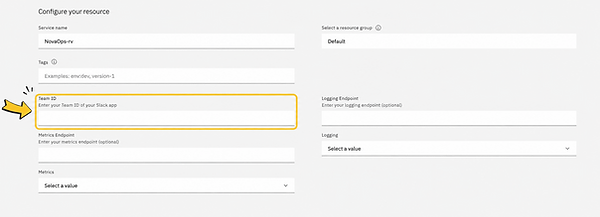
Before creating the NovaOps service in IBM Cloud, the customer must first install the NovaOps Slack app and get their Slack workspace Team ID.
The Team ID is required during the IBM Cloud setup process.
If an incorrect Team ID is entered, IBM Cloud will not be able to link the service instance to your Slack workspace, and service creation will fail.
Step 1: Install the NovaOps Slack App
First, install the NovaOps app in your Slack workspace using the link below.
Once you click the link:
-
Slack will ask for permission to install the app.
-
Review the list of permissions we request.
-
Click Allow to confirm.
After installing the app:
-
Create or choose the Slack channel where you want to use NovaOps.
-
Add the NovaOps app to that channel.
-
In the channel, ask NovaOps:
what is my team id?
NovaOps will reply with your Slack Workspace Team ID.
Copy and save this Team ID — you will need it during the IBM Cloud service creation process.
Step 2: Create the NovaOps Service in IBM Cloud
Open the NovaOps service page in IBM Cloud.
On the service creation page:
-
Review the service details
-
Select the appropriate pricing plan
-
Continue to the configuration section
Step 3: Enter the Slack Team ID
In the Team ID field, paste the Team ID you copied from Slack.
This field is mandatory.
The Team ID must match the Slack workspace that installed the NovaOps app.
You may also see optional configuration fields such as:
-
Logging Endpoint
-
Metrics Endpoint
-
Logging Type
-
Metrics Type
These integrations can also be configured later in the NovaOps onboarding application.
Wrong Team ID Error
If an incorrect Team ID is entered, IBM Cloud will not be able to locate the matching NovaOps workspace.
You may see an error similar to:
If this happens:
-
Return to Slack.
-
Ask NovaOps again:
what is my team id?
-
Copy the exact Team ID returned by NovaOps.
-
Retry the IBM Cloud service creation using the correct Team ID.
Step 4: Open the NovaOps Onboarding App
After successfully creating the IBM Cloud service, open the NovaOps onboarding application:
** add link here ***
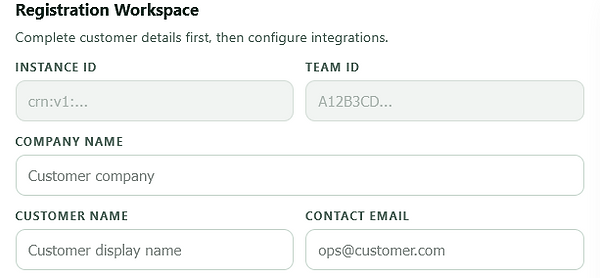
The onboarding application is used to complete customer registration and configure integrations.
Step 5: Complete Customer Details
In the onboarding app, fill in the customer details:
-
Company name
-
Customer display name
-
Contact email
-
Team ID
-
Instance ID
The Instance ID is automatically loaded from IBM Cloud when available.
Click Save after entering the customer details.
Step 6: Add Kubernetes Credentials
Use the Kubernetes Credentials section to securely store Kubernetes access details.
If no kubeconfig has been configured yet, the application will display:
No saved kubeconfig entries found in DB.
Add your Kubernetes configuration to enable NovaOps Kubernetes integrations.
Step 7: Add Observability Integrations
NovaOps supports integrations for both logging and metrics platforms.
Logging Integration
Select Add A New Logging to configure a logging source.
Supported examples include:
-
Loki
-
Elasticsearch
-
Other
Metrics / Metering Integration
Select Add A New Metering to configure a metrics source.
Supported examples include:
-
Prometheus
-
Instana
-
Other
Using “Other”
If your logging or metrics platform is not listed, choose Other.
NovaOps can work with your team to add support for additional observability providers.
Step 8: GitHub MCP Integration
The onboarding application also includes a GitHub MCP Integration section.
If GitHub MCP has not been configured yet, the application will display:
GitHub MCP not configured.
Configure this integration if you want NovaOps to access GitHub-related workflows and repositories.
8. Typical Customer Workflow
A typical incident workflow with NovaOps may look like this:
-
An alert is triggered from a monitoring system.
-
The SRE or DevOps engineer opens Slack or Microsoft Teams.
-
The engineer asks NovaOps a question such as:
-
“Why is this service failing?”
-
“What changed before this incident?”
-
“Show me the likely root cause.”
-
“What remediation steps do you recommend?”
-
-
NovaOps analyzes the connected data sources.
-
NovaOps provides an evidence-based explanation and recommended next steps.
-
The engineer reviews the recommendation.
-
If action is required, NovaOps can guide the engineer through approved remediation steps.
-
The engineer verifies recovery with NovaOps’s assistance.
9. Example Use Cases
Kubernetes Incident Investigation
NovaOps can help investigate common Kubernetes issues such as:
-
CrashLoopBackOff
-
Pod restarts
-
KubePodNotReady
-
Resource pressure
-
Deployment failures
-
Service connectivity issues
-
Configuration-related failures
Cloud Infrastructure Investigation
NovaOps can help investigate cloud infrastructure issues such as:
-
Service downtime
-
Infrastructure misconfiguration
-
Network-related failures
-
Resource exhaustion
-
Permission or access errors
-
Deployment-related incidents
Observability Analysis
NovaOps can analyze operational signals from:
-
Logs
-
Metrics
-
Traces
-
Alerts
-
Dashboards
-
Incident history
Runbook Assistance
NovaOps can help engineers follow customer-defined runbooks and operational procedures during incident response.
10. Security and Access Model
NovaOps is designed with enterprise security in mind.
Key security principles include:
-
Customer-controlled access permissions
-
Least-privilege access model
-
Read-only investigation mode where applicable
-
Human approval for sensitive actions
-
Policy-aware operational workflows
-
Customer-specific knowledge separation
-
Secure integration with enterprise systems
qaTT recommends starting with read-only access during initial onboarding and enabling additional action permissions only after customer approval and security review.
11. Data Handling
NovaOps processes customer operational data only for the purpose of delivering the service and supporting customer-authorized workflows.
Operational data may include:
-
Logs
-
Metrics
-
Traces
-
Alerts
-
Infrastructure metadata
-
Kubernetes metadata
-
Runbooks
-
Incident history
-
Service topology
qaTT does not require ownership of customer data. Customer data remains the property of the customer.
Data handling and retention terms should be governed by the customer agreement, privacy policy, and data processing agreement.
12. Permissions Required
The exact permissions required depend on the customer’s selected integrations and use cases.
Typical permission categories may include:
Read-Only Investigation Permissions
-
Read logs
-
Read metrics
-
Read traces
-
Read alerts
-
Read Kubernetes resources
-
Read infrastructure metadata
-
Read service topology
Optional Action Permissions
Optional permissions may be configured for approved remediation workflows. These should be granted only when required and after customer security approval.
Examples may include:
-
Restarting a service
-
Scaling a deployment
-
Triggering a workflow
-
Running approved scripts
-
Executing predefined operational actions
Sensitive actions should follow the customer’s internal approval process.
13. Onboarding Requirements
To onboard NovaOps, the customer may need to provide:
-
Primary technical contact
-
Target cloud or Kubernetes environment details
-
Monitoring and observability tool information
-
Slack or Microsoft Teams workspace details
-
Required access permissions
-
Security requirements
-
Incident response workflow details
-
Runbooks or operational documentation, if available
14. Administrator Responsibilities
Customer administrators are responsible for:
-
Approving integrations
-
Managing access permissions
-
Defining who can use NovaOps
-
Reviewing recommended operational actions
-
Approving sensitive workflows
-
Maintaining internal security policies
-
Notifying qaTT of major environment or integration changes
15. User Responsibilities
Users of NovaOps should:
-
Use NovaOps for authorized operational purposes only
-
Review recommendations before taking action
-
Follow internal incident response procedures
-
Avoid sharing unnecessary sensitive information in chat
-
Escalate unclear or high-risk recommendations to senior engineers
-
Confirm resolution after remediation steps are completed
16. Support
For support, customers should use the official qaTT support process provided during onboarding or listed on the qaTT support page.
Support may include:
-
Product access issues
-
Integration issues
-
Incident investigation questions
-
Configuration support
-
Security or permission questions
-
Marketplace activation questions
Recommended support channels may include:
-
Support ticket form
-
Support email
-
Scheduled onboarding or technical support call
-
Customer success contact
17. Service Status
qaTT may provide a service status page or operational update channel where customers can check availability, incidents, and maintenance updates.
If a service status page is not yet available, customers should contact qaTT support for service availability questions.
18. Documentation Updates
qaTT may update this documentation from time to time as new features, integrations, and security capabilities are added.
Customers should refer to the latest version of the documentation available through the official qaTT documentation URL.
19. Suggested Documentation URL for IBM Marketplace
For IBM Marketplace, qaTT should use a dedicated technical documentation URL, for example:
or
This URL should not point to the general contact page. It should point to a technical documentation page that includes product overview, onboarding, setup, integrations, permissions, usage, security, and support guidance.
20. Contact
For additional information, customers may contact qaTT through the official company website:
or email us: info@qatt.online
For support, customers should use the dedicated support page or ticketing process provided by qaTT.